CRM Strategy & Setup
Stop losing leads between forms, inboxes, spreadsheets, and sales calls.
Millionify designs and configures your CRM so every lead is captured, assigned, followed up, moved through the right pipeline, and reported clearly.
50+CRM platforms supported
SLAlead response rules
360pipeline visibility
GHLGoHighLevelHSHubSpotSFSalesforceZOZohoPDPipedriveD365Microsoft DynamicsKPKeapKJKajabi
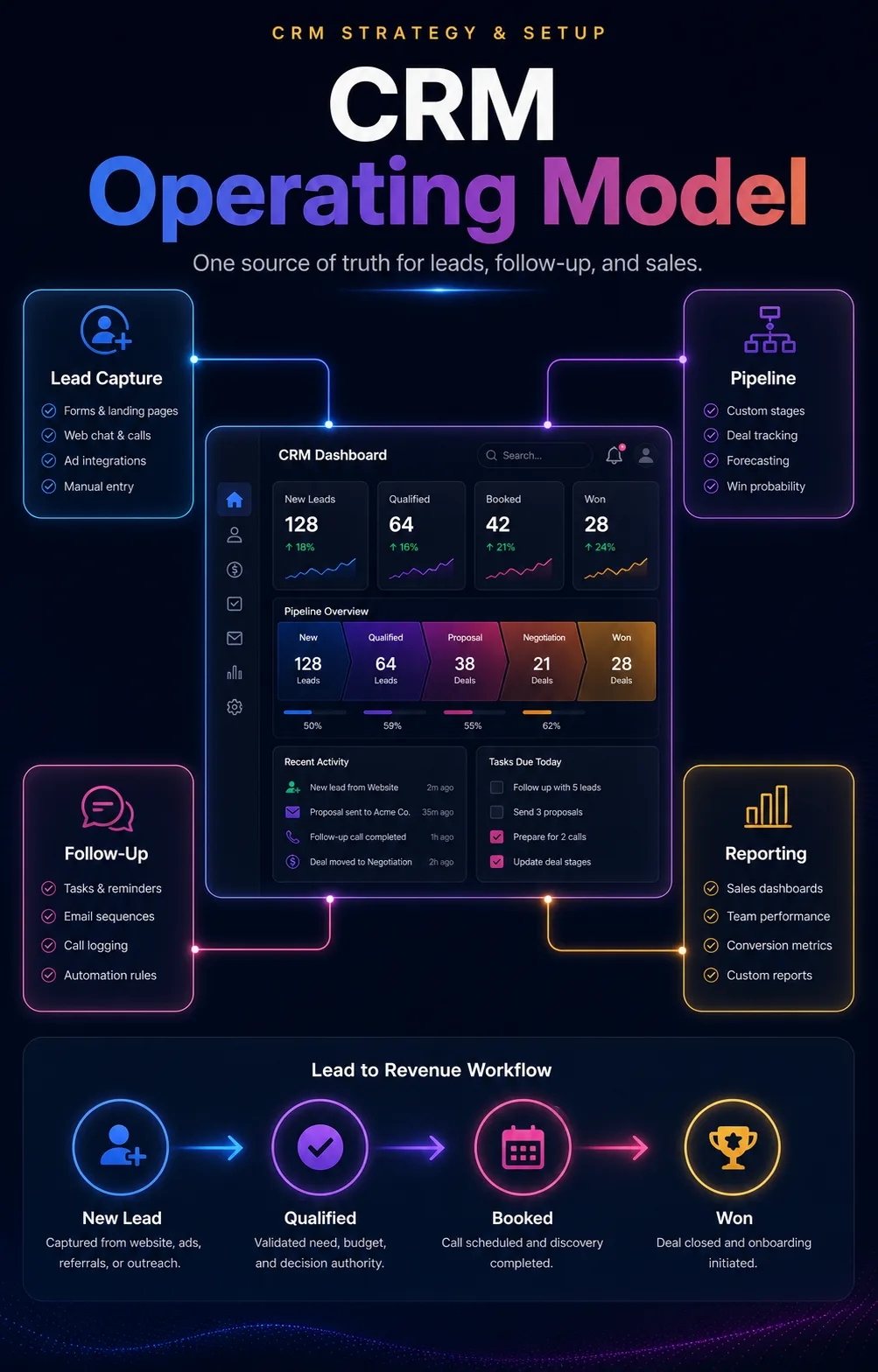
(01)CRM operating layer
CRM works when the sales process is built for follow-up.
Most businesses do not need another messy tool. They need a practical sales operating system where leads are visible, owned, followed up, measured, and improved.
Want a CRM your team can actually use every day?
Book a strategy call and we will map your lead sources, sales stages, follow-up gaps, platform fit, and reporting priorities.
(02)CRM platforms
Trained across 50+ CRMs and all-in-one sales platforms.
Our team has worked across almost all of the top CRM, sales, funnel, and marketing automation platforms. We help you choose, clean up, migrate, or configure the system around your actual lead flow instead of forcing your business into one tool.
Including but not limited to GoHighLevel, HubSpot, Salesforce, Zoho, Kajabi, Kartra, Keap, Groove, Pipedrive, Microsoft Dynamics, ActiveCampaign, monday sales CRM, Freshsales, Zendesk Sell, and many more popular CRMs.
Forms, calls, chats, ads, funnels, and referrals should flow into a CRM your team actually sees.
Assignment rules, source tags, task creation, and alerts make lead handling less dependent on memory.
Reminders, email, SMS, WhatsApp, booking steps, and sales tasks keep opportunities moving without robotic automation.
Owners can see new leads, contacted leads, qualified opportunities, proposals, stuck deals, and wins.
Response time, source quality, stage conversion, pipeline value, won/lost reasons, and next actions become measurable.
(03)Lead handling system
From scattered inquiries to a lead-handling engine.
CRM setup should connect the full path: where the lead came from, who owns it, what stage it is in, what follow-up is due, and whether the opportunity is moving.
Lead source clarity
Website, funnel, ad, chat, call, referral, and manual leads are tagged so source quality can be reviewed.
Owner and next step
Each lead has an owner, stage, next action, due date, and alert path before it can fall through the cracks.
Sales feedback loop
Won/lost reasons, bad-fit patterns, stale opportunities, and quality notes guide marketing and sales decisions.
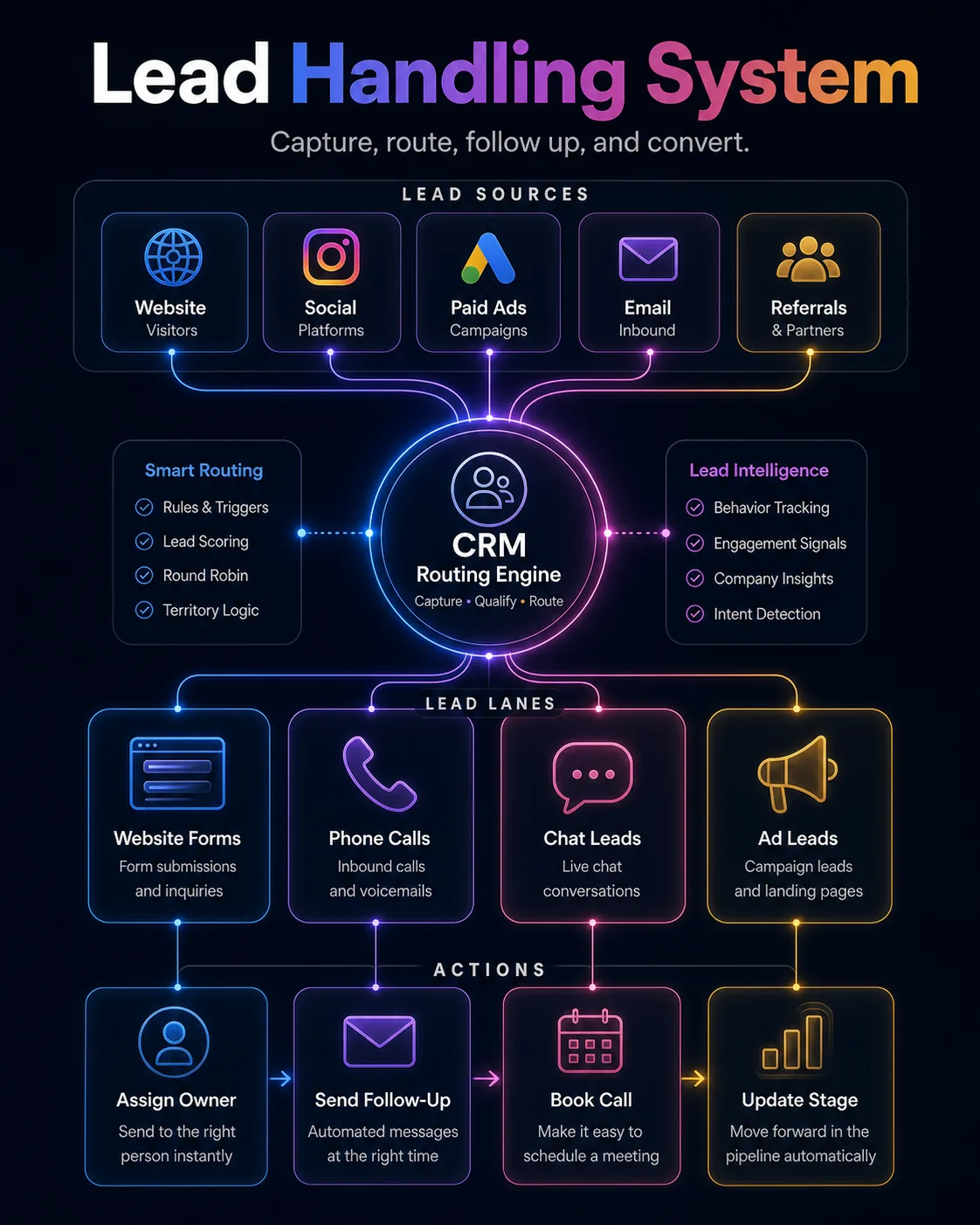
CRM operating systemLead capture, routing, follow-up, pipeline, and reporting.
(04)How we work
How we turn CRM from a database into a sales operating system.
We do not start by adding more fields. We start by understanding your lead sources, sales process, follow-up expectations, reporting needs, and the daily workflow your team will actually follow.
Sales process and lead-path audit
We inspect forms, inboxes, calls, calendars, spreadsheets, campaigns, current CRM fields, and where leads disappear.
CRM platform-fit decision
We recommend the best setup path across GoHighLevel, HubSpot, Salesforce, Zoho, Pipedrive, Kajabi, Kartra, Keap, Groove, or your current CRM.
Pipeline, fields, and ownership model
We define stages, required fields, lead sources, qualification rules, owner assignment, permissions, and what counts as won.
Lead capture and routing setup
We connect forms, funnels, call tracking, chats, calendars, source tags, notifications, and assignment logic.
Automation and follow-up workflows
We build tasks, reminders, email/SMS/WhatsApp steps, missed-lead alerts, stale-deal nudges, and reactivation paths.
Reporting, training, and improvement
We create useful dashboards, document the workflow, train the team, and refine the system after real usage.
Good CRM setup should make the next sales step obvious.
Every lead should have a source, owner, stage, next action, follow-up history, and reporting trail your team can trust.
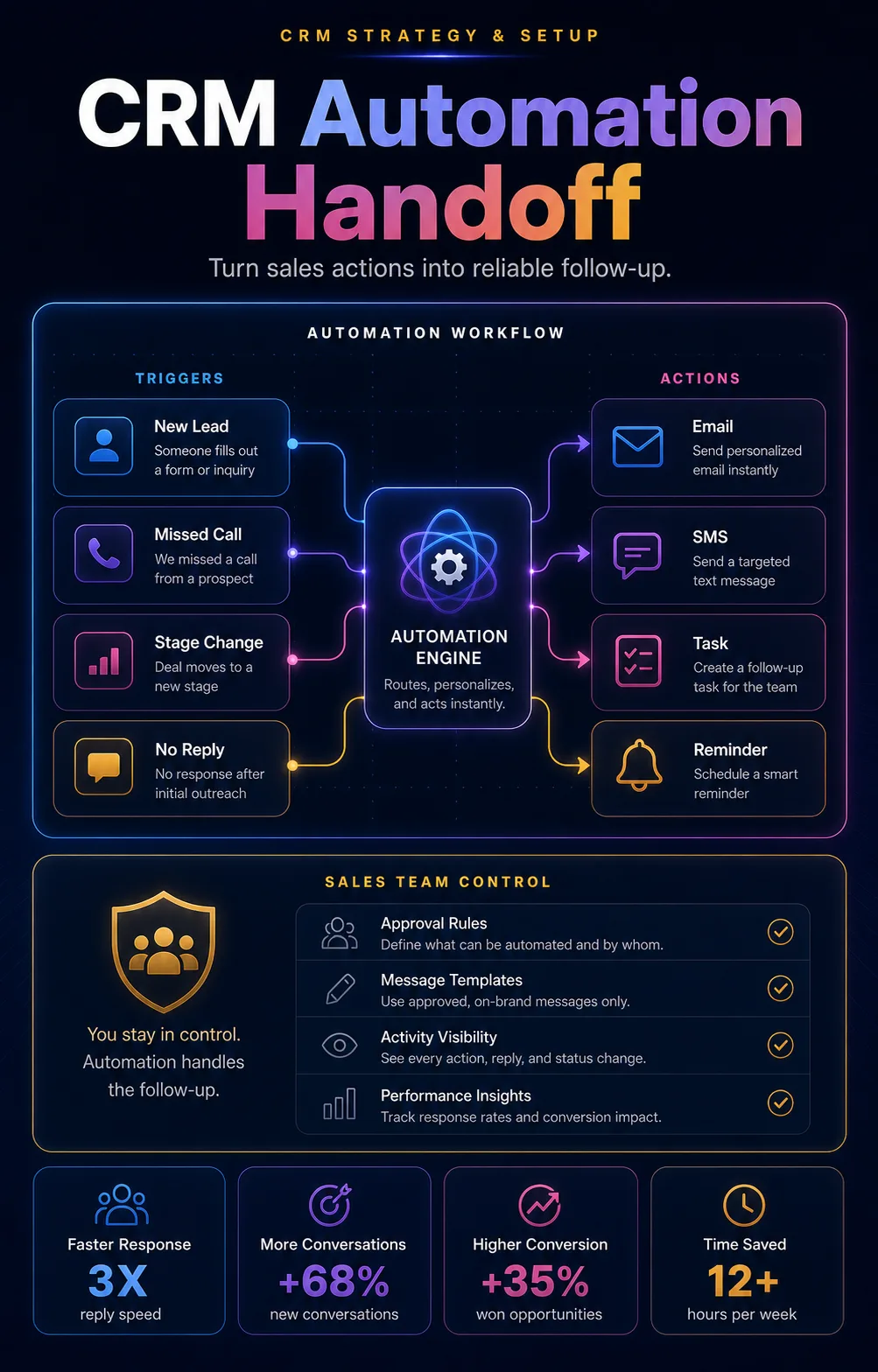
Follow-up cockpitTasks, reminders, alerts, messages, and owner handoff.
(05)Automation and handoff
Automation should protect follow-up without making sales feel robotic.
CRM automation works best when it helps humans respond faster: assigning leads, creating tasks, sending reminders, notifying owners, and nudging stale opportunities.
Speed-to-lead rules
Alerts and timers help the team respond quickly while intent is still warm.
Follow-up sequences
Email, SMS, WhatsApp, tasks, and call reminders can be structured around real buyer moments.
Revenue operations
Pipeline stages, reporting, permissions, and team routines make CRM part of how growth is managed.
(06)Engagement modes
Whether you are choosing, setting up, or fixing a CRM, the plan changes.
Some teams need a CRM blueprint. Some need the system configured. Others already have a CRM that needs cleanup, adoption, automation, reporting, and better daily usage.
Blueprint
CRM strategy- Lead-source, lifecycle, and sales-process audit
- Pipeline stages, fields, ownership, and permissions map
- Platform-fit recommendation and migration plan
- Dashboard and sales-operating rhythm brief
Setup
CRM buildout- CRM configuration, field cleanup, and pipeline setup
- Forms, calendars, calls, chat, and source tracking connections
- Owner assignment, tasks, alerts, and follow-up workflows
- Dashboards for leads, stages, response, and source quality
Optimize
Existing CRM- Usage audit, duplicate cleanup, and field simplification
- Automation repair, SLA alerts, stale-deal nudges, and reactivation
- Team training, SOPs, and daily sales workflow cleanup
- Monthly improvement view with stuck points and next actions
Not sure whether to keep, clean up, or migrate your CRM?
Book a strategy call and we will review your lead flow, sales process, current tools, team usage, and reporting needs before recommending the next step.
(07)Reporting
Track the CRM signals that actually guide sales follow-up.
CRM reporting should show more than a pile of contacts. It should reveal response speed, source quality, stage movement, stuck deals, pipeline value, and the actions that need attention.
Response speed
How quickly new inquiries are assigned, contacted, followed up, and moved into the next step.
Source quality
Which forms, pages, funnels, ads, referrals, or campaigns create better-fit opportunities.
Pipeline movement
Stage conversion, stuck deals, proposal follow-up, booked calls, won/lost reasons, and owner activity.
Next actions
Clear recommendations for fields, automations, team usage, reporting, follow-up, and cleanup.
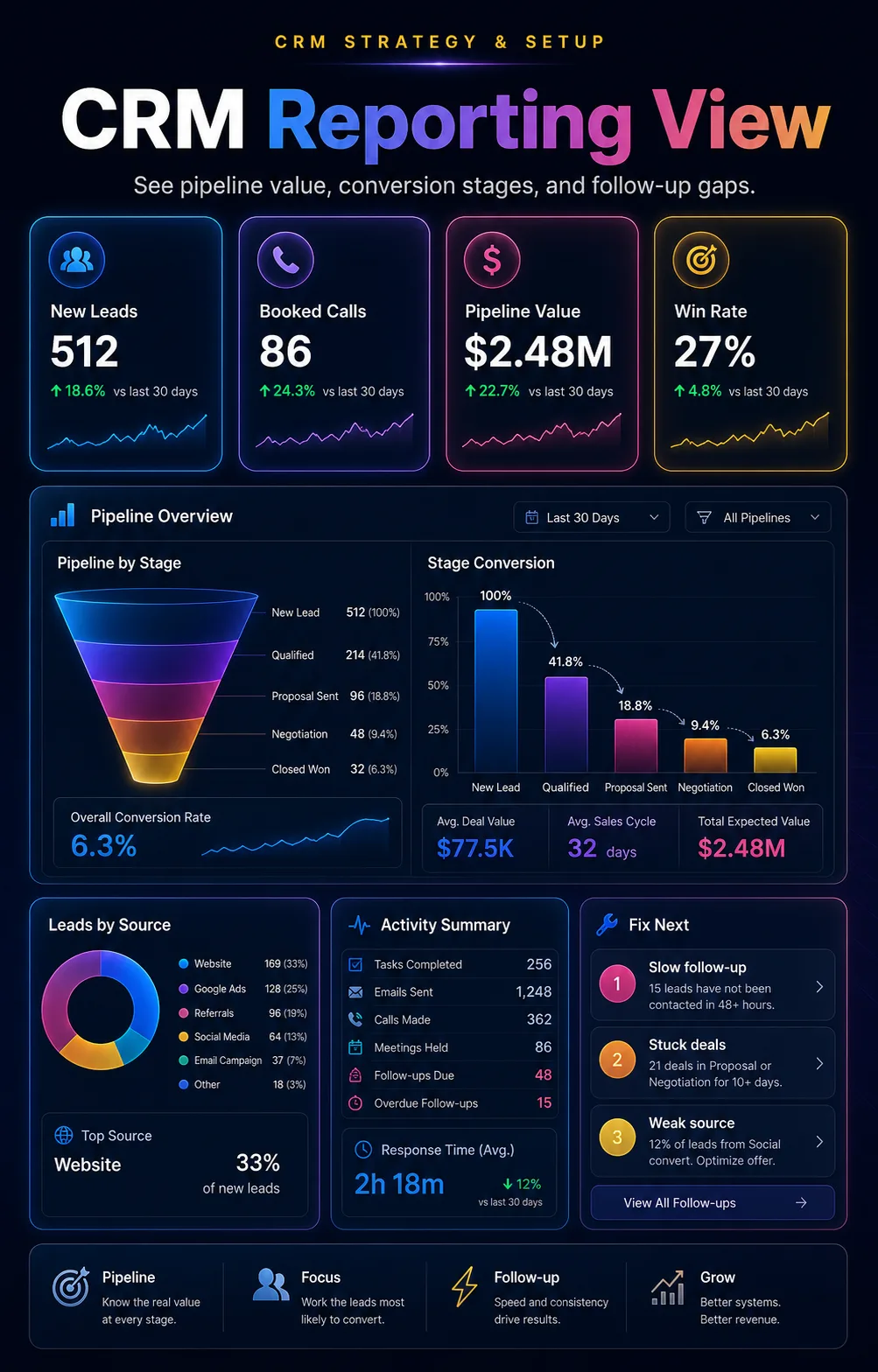
Clear CRM viewSources, stages, owners, follow-up, pipeline, and next actions.
(07)What people say
Client proof
Real clients. Real testimonials.
 ★★★★★
★★★★★
Millionify helped from strategy through launch, delivered the funnel professionally, and handled every change with care.
 ★★★★★
★★★★★
Communication was easy and consistent, the attention to detail was strong, and the final quality exceeded expectations.
 ★★★★★
★★★★★
Fast, responsive, accurate, and deeply knowledgeable. Millionify became the go-to team for funnel work.
 ★★★★★
★★★★★
Knowledgeable, communicative, and willing to go above and beyond to get the project right.
 ★★★★★
★★★★★
The work led to a meaningful increase in traffic and leads after the engagement.
 ★★★★★
★★★★★
Reliable, fast, honest, and straightforward to work with.
 ★★★★★
★★★★★
Millionify made sure every required piece was in place to complete the project successfully.
 ★★★★★
★★★★★
Helpful, patient, communicative, and genuinely invested in the outcome of the work.
(09)Questions
CRM strategy and setup questions (F.A.Q.).
Our team is trained across 50+ CRMs and all-in-one sales and marketing platforms, including GoHighLevel, HubSpot, Salesforce, Zoho, Pipedrive, Microsoft Dynamics, Keap, Kajabi, Kartra, Groove, ActiveCampaign, monday sales CRM, Freshsales, Zendesk Sell, ClickFunnels, Systeme.io, and many more. We do not force one platform first; we map the sales process and then configure the tool that fits the business.
Yes. That usually means the setup is too messy, too manual, or not connected to daily sales behavior. We simplify stages, fields, ownership rules, reminders, dashboards, and training so the CRM becomes easier to use.
Yes. We can help with field mapping, duplicate cleanup, source tagging, lifecycle cleanup, import checks, and safer migration planning before records are moved.
It should not. We build human-first workflows: automation creates tasks, alerts, reminders, timely messages, and reactivation prompts while your team still owns the relationship.
Yes. The CRM is strongest when it connects to the lead sources that create demand: website forms, landing pages, ad campaigns, booking calendars, calls, chats, email, and WhatsApp where relevant.
We define reporting around response time, lead source quality, stage conversion, pipeline value, stuck opportunities, booked calls, won/lost reasons, and follow-up activity.
Ready to make every lead visible, owned, and followed up?
Tell us what CRM you use, where your leads come from, and where follow-up breaks today. We will map the next CRM setup plan.